The automotive repair industry has witnessed a significant evolution in recent years, with engine control units (ECUs) becoming increasingly sophisticated. Among the most challenging modules to work with are the Toyota GEN3 ECUs, particularly those equipped with the Renesas R7F701216 microprocessor. These units are found in a growing number of modern Toyota vehicles and require specialized equipment and precise procedures for successful data reading, writing, and cloning operations.
Fortunately, OBDSTAR has stepped up to meet this challenge. Both the X300 Classic G3 (equipped with the ECU Flasher license) and the DC706 ECU Tool now offer full support for Toyota GEN3 R7F701216 ECUs in Bench mode. This guide provides a comprehensive walkthrough of the entire process, from setup to execution.
Understanding the Toyota GEN3 R7F701216 ECU
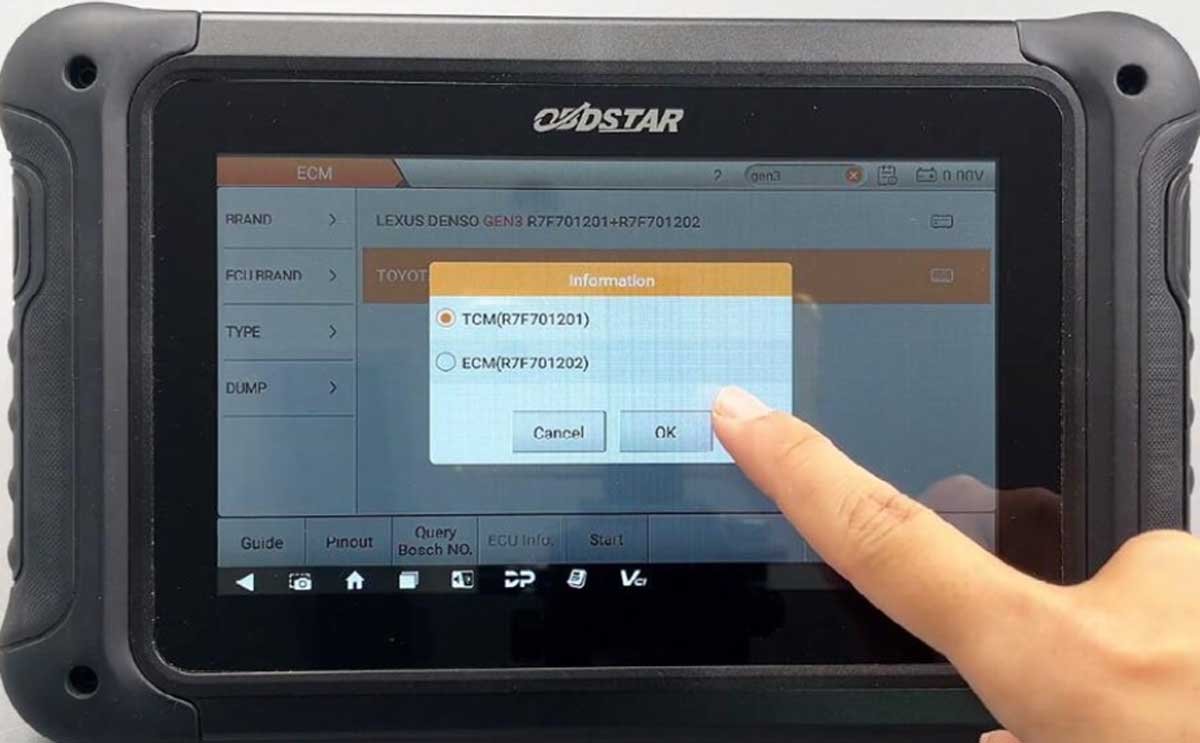
The Toyota DENSO GEN3 ECU is a sophisticated engine control module that utilizes dual microprocessors—typically R7F701202 for ECM data storage and R7F701201 for TCM data storage. The R7F701216 variant is a high-performance microcontroller from Renesas that manages critical engine functions. When performing cloning or data recovery operations, it’s essential to understand that both MCUs may need to be addressed depending on the specific requirements of the job.
Essential Tooling and Requirements
Before beginning any operation on a Toyota GEN3 ECU, ensure your workstation is properly equipped with the following:
- OBDSTAR Hardware: Either the X300 Classic G3 with an active ECU Flasher license, or the DC706 ECU Tool (Full Version)
- MP001 Programmer: This specific interface is required for the Toyota GEN3 protocol
- Power Supply: A stable, high-power DC regulated power supply is critical
- Cables: Standard main cable and the necessary jumper wire set
- Target Unit: Toyota GEN3 (R7F701216) ECU
Step-by-Step Operation Workflow
1.Firmware Update
Before proceeding, ensure your OBDSTAR device is running the latest software version. This is crucial for accessing current ECM databases and ensuring compatibility with the latest vehicle models. Regular updates from OBDSTAR continuously expand vehicle coverage and improve functionality.
2.Locate the Correct Protocol
Navigate to ECU Flasher > ECM > ECM V32.90 within the software interface. Use the search box and type “gen3” to filter the results quickly. This will display the available Toyota GEN3 options.
3.Select the Target
Choose Toyota DENSO GEN3 (M15A-EXE) R7F701216 from the list. The software will then prepare the necessary protocols for communication with the ECU.
4.Consult Pinouts and Instructions
Tap “Guide” to review the operation instructions, and “Pinout” to visualize the connection diagram. Ensure that both BENCH mode and MP001 are selected as the connection method. The wiring configuration for the Toyota GEN3 R7F701216 is as follows:
ECU PinConnectionB-Pin 1 & 312V (16)B-Pin 6 & 32GND (4+5)B-Pin 26CAN L (14)B-Pin 13CAN H (6)5. Hardware Connection
Connect the OBDSTAR MP001 Programmer to your X300 Classic G3 or DC706 main unit. Then, using the provided jumper wires, bridge the connections between the programmer and the Toyota GEN3 ECU according to the pinout diagram. Double-check all connections before applying power—incorrect wiring can damage both the ECU and the programming tool.
6.Executing Data Transfer
With the hardware properly connected and power applied, follow these steps:
Maintain constant power to the OBDSTAR unit throughout the entire process. Any interruption could corrupt the data transfer.
- Connect: Use the software interface to initialize the connection to the ECU. The software will verify communication and confirm readiness.
- Read: Extract and save the original INT FLASH (R7F701216) data. This creates a backup of the original ECU data—a critical safety measure before any write operation.
- Write: If performing a cloning operation, swap connections to the replacement (new) ECU and upload the original data to complete the cloning process.
Important ConsiderationsPower Stability
A stable power supply cannot be overemphasized. Voltage fluctuations during read/write operations can lead to corrupted data or even permanent damage to the ECU. Use a high-quality regulated power supply rated for the appropriate current draw.
Software Version Compatibility
Always verify that your ECM software version meets the minimum requirements. For DC706 users working with related GEN3 variants, version V31.35 or above is recommended. For the R7F701216 protocol specifically, ensure you’re running the latest available version.
Dual MCU Awareness
As noted earlier, the Toyota DENSO GEN3 ECU contains two separate MCUs. While this guide focuses on the R7F701216 (ECM), some operations may also require working with the companion MCU. If cloning the entire ECU, both units may need to be addressed.
Internet Connection
An active and stable internet connection is required during operation to verify licenses and access the latest protocol databases.
Conclusion
The OBDSTAR X300 Classic G3 and DC706 ECU Tool, when paired with the MP001 Programmer, provide a reliable and professional solution for reading, writing, and cloning Toyota GEN3 R7F701216 ECUs. The Bench mode operation is straightforward when following the proper procedures, and the comprehensive pinout guides within the software eliminate much of the guesswork.
As Toyota continues to deploy these advanced ECUs across their vehicle lineup, having the capability to service them in-house becomes increasingly valuable for automotive repair professionals. With the right tools and careful attention to procedure, OBDSTAR users can confidently tackle Toyota GEN3 R7F701216 ECU operations—saving time, reducing costs, and expanding their service capabilities.
For the latest updates on vehicle coverage and protocol support, always check for new firmware releases from OBDSTAR. The aftermarket diagnostic landscape is constantly evolving, and staying current with software updates ensures you’re always ready for whatever comes through your workshop doors.